Microsoft - AB-620: Designing and Building Integrated AI Solutions in Copilot Studio
Sample Questions
Question: 125
Measured Skill: Test and manage agents (20–25%)
A solution architect is implementing a governance process for an agent developed in Copilot Studio. Before the agent is moved to production, the organization requires a standardized validation process to ensure that updates to the underlying knowledge base do not cause regressions in response accuracy.
The validation process must satisfy the following technical criteria:
- Consistency: Execute a fixed library of test cases containing specific user prompts.
- Grounding: Measure the quality of the generated output against a
verified “golden” response.
- Comparison: Provide a performance delta between the current version and previous test runs.
You need to choose an evaluation method that meets the requirements.
What should you use?| A | Use the Test your agent pane to manually enter questions and verify that the correct topic or action triggers for each turn. |
| B | Publish the agent and use channel usage metrics as the primary evaluation method. |
| C | Enable Conversation Transcripts in Analytics and perform a keyword search to identify if the agent uses the correct knowledge sources. |
| D | Use a predefined test set and compare results against expected outcomes across runs. |
Correct answer: DExplanation:
The requirements map directly to the Copilot Studio evaluation capability. Using a predefined test set (often called a "golden dataset") and comparing results against expected outcomes across runs is the exact industry standard and best practice for this scenario.
In the context of Copilot Studio and LLM governance, this method is known as Regression Testing or Automated Evaluation.
Consistency: Fixed library of test cases → Predefined test set containing specific prompts and expected responses.
Grounding: Compare output against a verified "golden" response → Evaluation uses expected outcomes/baselines to assess response quality.
Comparison: Measure performance delta against previous runs → The same test set can be rerun and results compared across iterations and versions.
References:
Run evaluations and view results
How to evaluate AI agents in Microsoft Copilot Studio
Question: 126
Measured Skill: Test and manage agents (20–25%)
A team is preparing to assess an agent in Copilot Studio before expanding access to additional users.
The team requires an evaluation that provides controlled, repeatable, and consistently measured test runs.
The evaluation must:
- Be triggered directly by the team to control when testing occurs.
- Determine success based on clearly established acceptance criteria.
- Rely on a predefined set of inputs that ensures consistency across repeated runs.
You need to configure the evaluation to meet the requirements.
What should you configure?
(To answer, move the appropriate configurations to the correct evaluation requirements. You may use each configuration once, more than once, or not at all. NOTE: Each correct selection is worth one point.)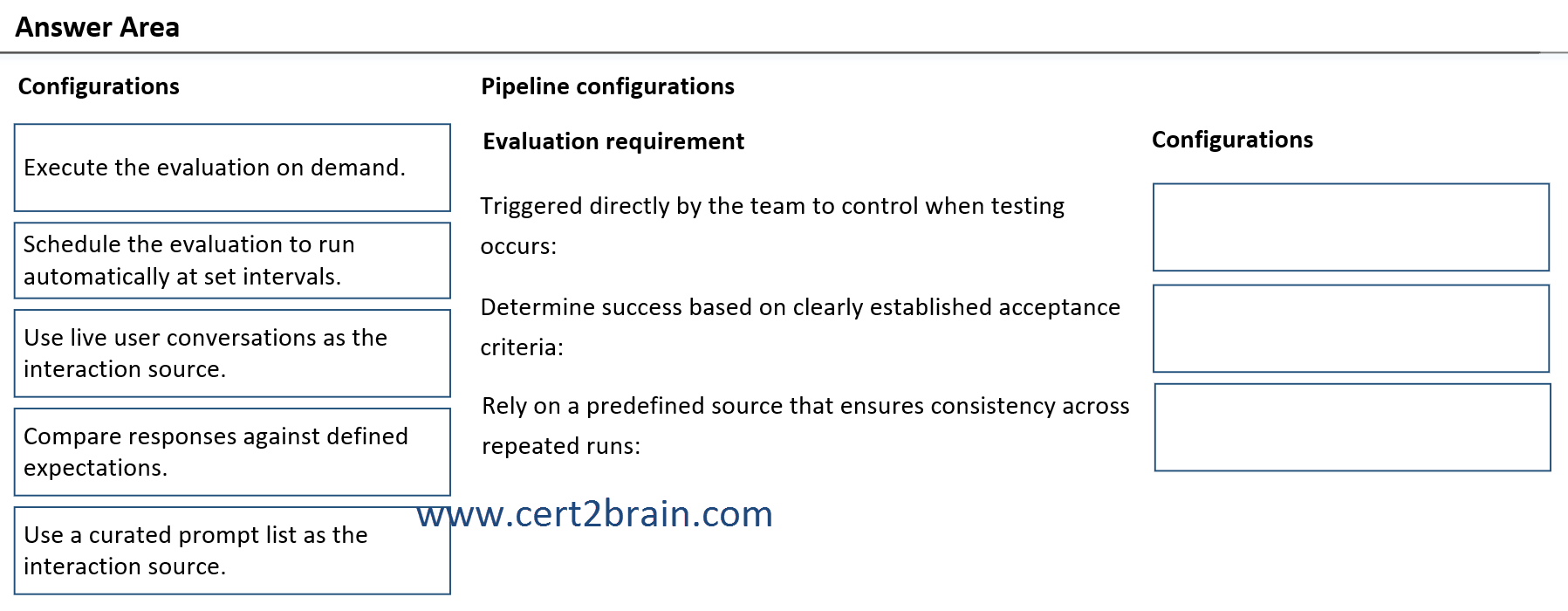
| A | Triggered directly by the team to control when testing occurs: Schedule the evaluation to run automatically at set intervals.
Determine success based on clearly established acceptance criteria: Compare responses against defined expectations.
Rely on a predefined source that ensures consistency across repeated runs: Use live user conversations as the interaction source. |
| B | Triggered directly by the team to control when testing occurs: Use live user conversations as the interaction source.
Determine success based on clearly established acceptance criteria: Use live user conversations as the interaction source.
Rely on a predefined source that ensures consistency across repeated runs: Schedule the evaluation to run automatically at set intervals. |
| C | Triggered directly by the team to control when testing occurs: Execute the evaluation on demand.
Determine success based on clearly established acceptance criteria: Compare responses against defined expectations.
Rely on a predefined source that ensures consistency across repeated runs: Use a curated prompt list as the interaction source. |
| D | Triggered directly by the team to control when testing occurs: Use a curated prompt list as the interaction source.
Determine success based on clearly established acceptance criteria: Use a curated prompt list as the interaction source.
Rely on a predefined source that ensures consistency across repeated runs: Use live user conversations as the interaction source. |
| E | Triggered directly by the team to control when testing occurs: Execute the evaluation on demand.
Determine success based on clearly established acceptance criteria: Use a curated prompt list as the interaction source.
Rely on a predefined source that ensures consistency across repeated runs: Schedule the evaluation to run automatically at set intervals. |
| F | Triggered directly by the team to control when testing occurs: Use a curated prompt list as the interaction source.
Determine success based on clearly established acceptance criteria: Use live user conversations as the interaction source.
Rely on a predefined source that ensures consistency across repeated runs: Use a curated prompt list as the interaction source. |
Correct answer: CExplanation:
Triggered directly by the team to control when testing occurs → Execute the evaluation on demand ensures the team decides exactly when a test run occurs, rather than relying on an automated schedule.
Determine success based on clearly established acceptance criteria → Compare responses against defined expectations provides objective pass/fail criteria by evaluating responses against expected outcomes or "golden" answers.
Rely on a predefined source that ensures consistency across repeated runs → Use a curated prompt list as the interaction source provides a fixed, repeatable set of inputs, ensuring consistency across evaluation runs.
References:
Run evaluations and view results
Create a single response test set
Question: 127
Measured Skill: Test and manage agents (20–25%)
A solution containing an agent in Copilot Studio is deployed to multiple environments that require different configuration values.
Configuration values must vary by environment without modifying the solution contents.
Configuration values must meet the following requirements:
- Allow values to be set during import.
- Exclude values from the agent definition.
- Run a dedicated agent instance for each individual environment.
You need to associate each requirement with the configuration approach.
What should you configure for each requirement?
(To answer, move the appropriate configurations to the correct requirements. You may use each configuration once, more than once, or not at all. NOTE: Each correct selection is worth one point.)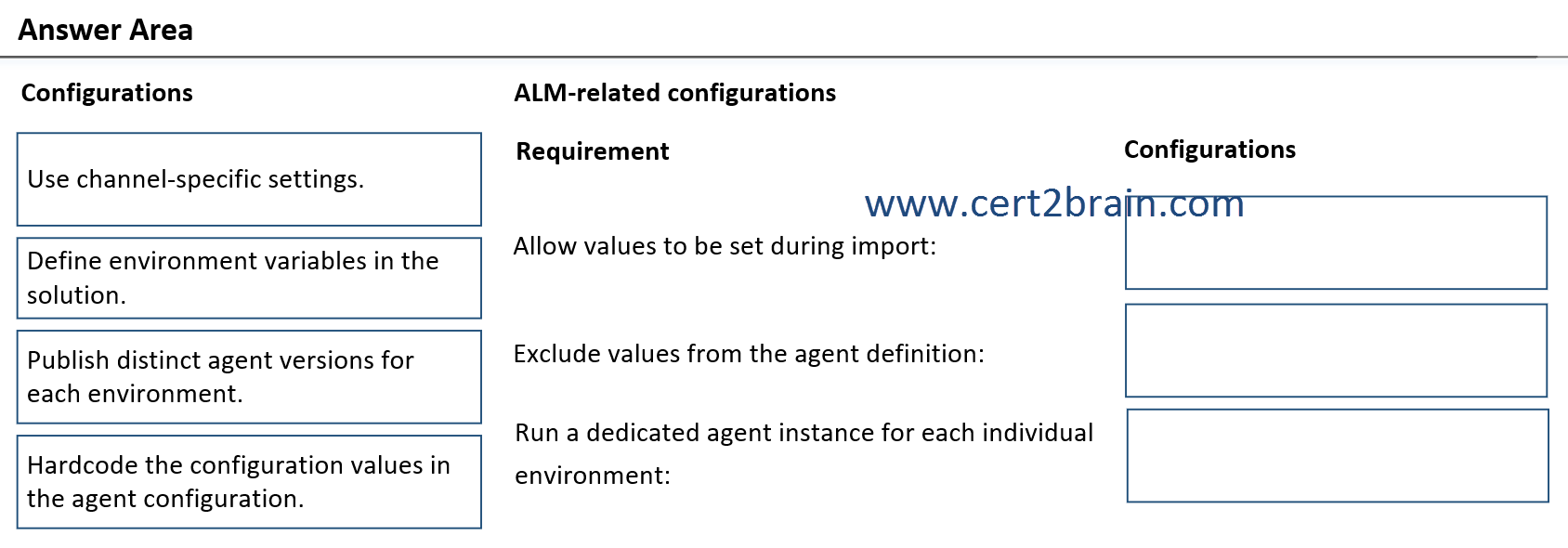
| A | Allow values to be set during import: Define environment variables in the solution.
Exclude values from the agent definition: Hardcode the configuration values in the agent configuration.
Run a dedicated agent instance for each individual environment: Use channel-specific settings. |
| B | Allow values to be set during import: Use channel-specific settings.
Exclude values from the agent definition: Use channel-specific settings.
Run a dedicated agent instance for each individual environment: Publish distinct agent versions for each environment. |
| C | Allow values to be set during import: Define environment variables in the solution.
Exclude values from the agent definition: Hardcode the configuration values in the agent configuration.
Run a dedicated agent instance for each individual environment: Define environment variables in the solution. |
| D | Allow values to be set during import: Define environment variables in the solution.
Exclude values from the agent definition: Use channel-specific settings.
Run a dedicated agent instance for each individual environment: Publish distinct agent versions for each environment. |
| E | Allow values to be set during import: Use channel-specific settings.
Exclude values from the agent definition: Publish distinct agent versions for each environment.
Run a dedicated agent instance for each individual environment: Hardcode the configuration values in the agent configuration. |
| F | Allow values to be set during import: Define environment variables in the solution.
Exclude values from the agent definition: Define environment variables in the solution.
Run a dedicated agent instance for each individual environment: Publish distinct agent versions for each environment. |
Correct answer: FExplanation:
Allow values to be set during import → Define environment variables in the solution
Environment variables are designed to hold configuration values separately from the solution components. During solution import, administrators can provide environment-specific values.
Exclude values from the agent definition → Define environment variables in the solution
Environment variables separate configuration from the agent's logic and definition, preventing hard-coded values inside the agent. This is a core ALM (Application Lifecycle Management) practice in Copilot Studio and the Power Platform.
Run a dedicated agent instance for each individual environment → Publish distinct agent versions for each environment
Each Power Platform environment hosts its own agent instance. When an agent is deployed across Development, Test, and Production environments, a separate instance exists in each environment. Publishing a version in each environment ensures that environment runs its own dedicated copy.
References:
Use environment variables in solution custom connectors
Export and import agents using solutions
Question: 128
Measured Skill: Plan and configure agent solutions (30–35%)
A company is building an agent topic in Copilot Studio. The agent topic uses a generative answers node to respond to user questions based on authorized knowledge sources.
To meet the business needs, the generative answers node must meet the following requirements:
- Use the user’s message in the generative answers node.
- Scope the topic node to query only designated data.
- Restrict responses to approved enterprise data.
You need to configure the generative answers node to meet the requirements.
What should you configure for each requirement?
(To answer, move the appropriate configurations to the correct requirements. You may use each configuration once, more than once, or not at all. NOTE: Each correct selection is worth one point.)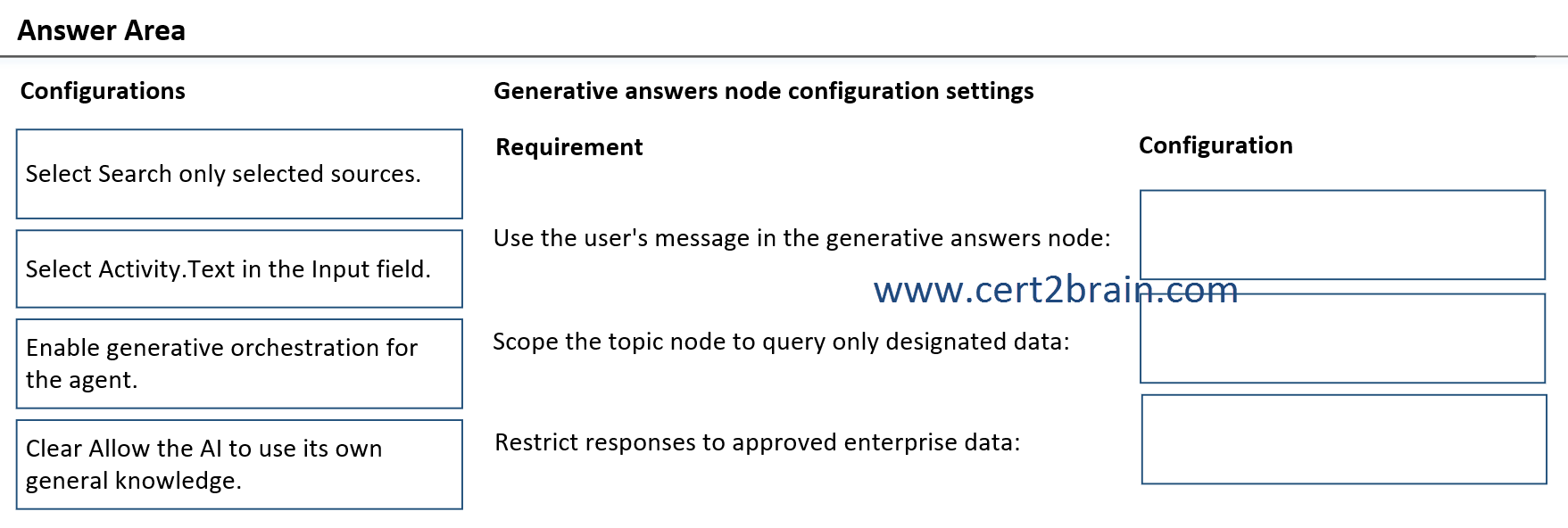
| A | Use the user's message in the generative answers node: Enable generative orchestration for the agent.
Scope the topic node to query only designated data: Select Activity.Text in the Input field.
Restrict responses to approved enterprise data: Clear Allow the AI to use its own general knowledge. |
| B | Use the user's message in the generative answers node: Select Activity.Text in the Input field.
Scope the topic node to query only designated data: Select Search only selected sources.
Restrict responses to approved enterprise data: Clear Allow the AI to use its own general knowledge. |
| C | Use the user's message in the generative answers node: Enable generative orchestration for the agent.
Scope the topic node to query only designated data: Select Activity.Text in the Input field.
Restrict responses to approved enterprise data: Select Search only selected sources. |
| D | Use the user's message in the generative answers node: Select Activity.Text in the Input field.
Scope the topic node to query only designated data: Enable generative orchestration for the agent.
Restrict responses to approved enterprise data: Clear Allow the AI to use its own general knowledge. |
| E | Use the user's message in the generative answers node: Select Search only selected sources.
Scope the topic node to query only designated data: Clear Allow the AI to use its own general knowledge.
Restrict responses to approved enterprise data: Select Activity.Text in the Input field. |
| F | Use the user's message in the generative answers node: Enable generative orchestration for the agent.
Scope the topic node to query only designated data: Select Search only selected sources.
Restrict responses to approved enterprise data: Clear Allow the AI to use its own general knowledge. |
Correct answer: BExplanation:
Use the user's message in the generative answers node → Select Activity.Text in the Input field.
The Input property of a Generative Answers node specifies the query that is sent to the knowledge sources. To use the user's question, select Activity.Text, which contains the user's message.
Scope the topic node to query only designated data → Select Search only selected sources.
A Generative Answers node can be configured to search only the knowledge sources specified for that node rather than all available knowledge sources. This limits the query scope to designated data sources.
Restrict responses to approved enterprise data → Clear Allow the AI to use its own general knowledge.
If Allow the AI to use its own general knowledge is enabled, Copilot Studio can supplement answers with information beyond the configured enterprise sources. Clearing this option restricts responses to the approved knowledge sources.
Reference: Use generative answers in a topic
Question: 129
Measured Skill: Integrate and extend agents in Copilot Studio (40–45%)
A company uses multiple Copilot Studio agents that perform specialized tasks.
You need to configure a Copilot Studio agent in your environment to connect to an external agent.
What should you do?| A | Provide A2A endpoint information for the target agent. |
| B | Enable generative answers to call the other agent. |
| C | Add a Power Platform connector tool that calls the other agent. |
| D | Add the target agent as an indexed knowledge source. |
Correct answer: AExplanation:
Copilot Studio supports connecting to external agents through the Agent2Agent (A2A) protocol. To connect an agent to another external agent, you add an A2A agent connection and provide the endpoint URL of the target agent. Copilot Studio then uses the A2A protocol to communicate with and delegate tasks to that external agent.
Reference: Connect an agent available over the Agent2Agent (A2A) protocol