Microsoft - AB-900: Microsoft 365 Copilot and Agent Administration Fundamentals
Sample Questions
Question: 104
Measured Skill: Perform basic administrative tasks for Copilot and agents (25–30%)
You need to ensure that users can use an external system as a knowledge source for custom Microsoft 365 Copilot agents.
What should you configure in the Microsoft 365 admin center?
(To answer, select the appropriate settings in the answer area.)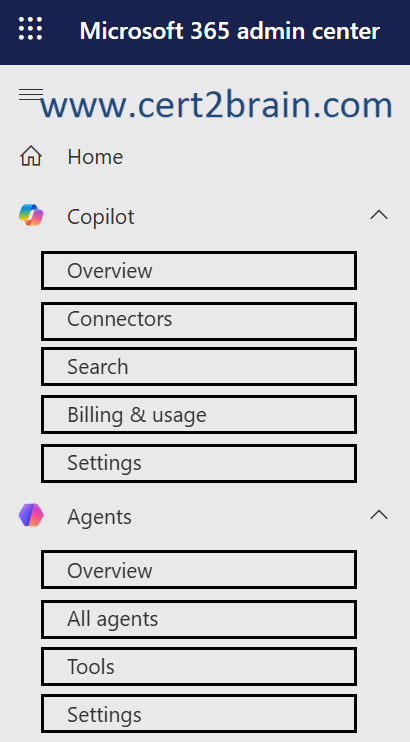
| A | Copilot - Connectors |
| B | Copilot - Search |
| C | Copilot - Settings |
| D | Agents - Overview |
| E | Agents - Tools |
| F | Agents - Settings |
Correct answer: AExplanation:
Microsoft 365 Copilot connectors extend the reach of Microsoft 365 Copilot and Microsoft Search experiences by connecting to data beyond Microsoft 365. Your organization can either index external data by using synced connectors or connect to data in real time by using federated connectors (early access preview). This flexibility ensures that users can securely search and interact with both enterprise and external data sources within Microsoft 365 apps and Copilot experiences.
References:
Connectors overview
Microsoft 365 Copilot connectors overview
Question: 105
Measured Skill: Understand data protection and governance tasks for Microsoft 365 and Copilot (35–40%)
An organisation needs to protect confidential financial reports so that only members of the finance team can open them, even if the files are accidentally shared externally.
Which Microsoft Purview feature should they use?| A | Data Loss Prevention (DLP) policies |
| B | Sensitivity labels with encryption |
| C | Retention policies |
| D | Communication Compliance policies |
Correct answer: BExplanation:
When you create a sensitivity label, you can restrict access to content that the label will be applied to. For example, with the encryption settings for a sensitivity label, you can protect content so that:
- Only users within your organization can open a confidential document or email.
- Only users in the marketing department can edit and print the promotion announcement document or email, while all other users in your organization can only read it.
- Users can't forward an email or copy information from it that contains news about an internal reorganization.
- The current price list that is sent to business partners can't be opened after a specified date.
- Only the people sent a meeting invite to kick off a confidential project can open the meeting invite and they can't forward it to others.
When a document, email, or meeting invite is encrypted, access to the content is restricted, so that it:
- Can be decrypted only by users authorized by the label's encryption settings.
- Remains encrypted no matter where it resides, inside or outside your organization, even if the file's renamed.
- Is encrypted both at rest (for example, in a OneDrive account) and in transit (for example, email as it traverses the internet).
Finally, as an admin, when you configure a sensitivity label to apply encryption, you can choose either to:
- Assign permissions now, so that you determine exactly which users get which permissions to content with that label.
- Let users assign permissions when they apply the label to content. This way, you can allow people in your organization some flexibility that they might need to collaborate and get their work done.
Reference: Restrict access to content by using sensitivity labels to apply encryption
Question: 106
Measured Skill: Perform basic administrative tasks for Copilot and agents (25–30%)
A department has created a custom agent in Microsoft 365 Copilot to help employees find internal policy documents.
Before the agent can be used by other employees, what must happen?| A | The agent is automatically available to all users once created. |
| B | The agent must go through an approval process before it can be shared. |
| C | Only the creator can ever use the agent. |
| D | The IT department must recreate the agent in the Microsoft 365 admin centre. |
Correct answer: BExplanation:
For a custom agent intended for broader organizational use, Microsoft provides an admin approval and publishing process.
You can submit agents you build with Agent Builder in Microsoft 365 Copilot to your organization's catalog for broader use. When you submit your agent, an admin reviews it in the Microsoft 365 admin center and, after they approve, publishes it to the Agent Store under Built by your org. From there, the agent is available as a trusted, organization-approved solution for users across your tenant.
Reference: Submit agents from Agent Builder to your org catalog
Question: 107
Measured Skill: Identify the core features and objects of Microsoft 365 services (30–35%)
An organisation has recently purchased Microsoft 365 E5 licences.
A new employee needs access to Microsoft Teams, Exchange Online, and SharePoint. The IT administrator wants to ensure the employee receives the correct level of access.
What is the most efficient way to manage this?| A | Assign individual service licences for Teams, Exchange, and SharePoint separately. |
| B | Assign the Microsoft 365 E5 licence to the user directly or through a group. |
| C | Create a custom role in Microsoft Entra that grants access to each service. |
| D | Configure conditional access policies to allow access to each application. |
Correct answer: BExplanation:
A Microsoft 365 E5 licence is a suite licence that includes entitlement to services such as Microsoft Teams, Exchange Online, and SharePoint Online. Assigning the suite licence provides the user with the appropriate service entitlements without having to assign each service individually.
Using group-based licensing is often the most efficient approach because new employees can receive the required licenses automatically when added to the appropriate group.
Reference: Microsoft 365 and Office 365 plan options
Question: 108
Measured Skill: Identify the core features and objects of Microsoft 365 services (30–35%)
Your organization is implementing a Zero Trust security model for its Microsoft 365 environment.
Which of the following best describes the core principle of Zero Trust?| A | Trust users on the corporate network but verify external connections. |
| B | Never trust any request, always verify identity and device health regardless of network location. |
| C | Block all access from outside the corporate firewall. |
| D | Trust all authenticated users once they pass multi-factor authentication. |
Correct answer: BExplanation:
Microsoft's Zero Trust model is based on the principle"never trust, always verify." Every access request is authenticated and authorized using available signals such as identity, device health, location, and risk, regardless of whether the request originates from inside or outside the corporate network.
Reference: Zero Trust as a security foundation