Microsoft - AI-901: Microsoft Azure AI Fundamentals
Sample Questions
Question: 180
Measured Skill: Identify AI concepts and responsibilities (40–45%)
Select the answer that correctly completes the sentence.
| A | Human oversight and control are goals of the Reliability & Safety principle in the Microsoft Responsible AI Standard Playbook. |
| B | Data governance and management are goals of the Reliability & Safety principle in the Microsoft Responsible AI Standard Playbook. |
| C | Ongoing monitoring, feedback, and evaluation are goals of the Reliability & Safety principle in the Microsoft Responsible AI Standard Playbook. |
| D | The minimization of stereotyping, demeaning, and erasing outputs are goals of the Reliability & Safety principle in the Microsoft Responsible AI Standard Playbook. |
Correct answer: CExplanation:
Microsoft defines Reliability and Safety as requiring AI systems to:
- operate reliably, safely, and consistently,
- function as designed,
- respond safely to unexpected conditions, and
- resist harmful manipulation.
Microsoft's current Responsible AI guidance also explicitly emphasizes ongoing monitoring and evaluation so AI systems continue operating within established responsible-AI boundaries after deployment.
Reference: Responsible AI considerations
Question: 181
Measured Skill: Identify AI concepts and responsibilities (40–45%)
For each of the following statements, select Yes if the statement is true. Otherwise, select No.
(NOTE: Each correct selection is worth one point.)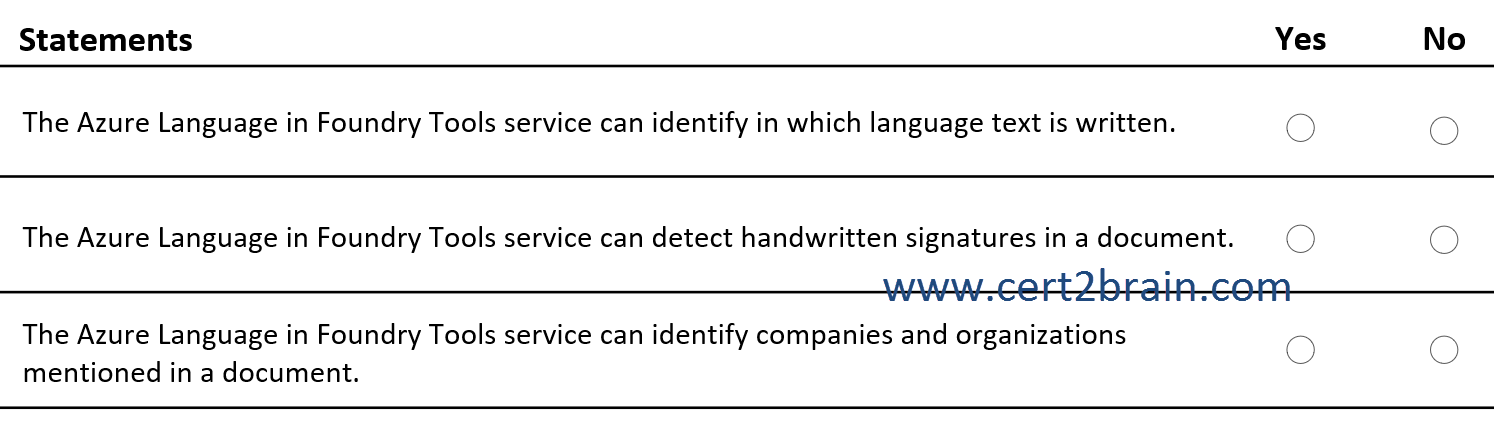
| A | The Azure Language in Foundry Tools service can identify in which language text is written: Yes
The Azure Language in Foundry Tools service can detect handwritten signatures in a document: Yes
The Azure Language in Foundry Tools service can identify companies and organizations mentioned in a document: Yes |
| B | The Azure Language in Foundry Tools service can identify in which language text is written: Yes
The Azure Language in Foundry Tools service can detect handwritten signatures in a document: No
The Azure Language in Foundry Tools service can identify companies and organizations mentioned in a document: No |
| C | The Azure Language in Foundry Tools service can identify in which language text is written: Yes
The Azure Language in Foundry Tools service can detect handwritten signatures in a document: No
The Azure Language in Foundry Tools service can identify companies and organizations mentioned in a document: Yes |
| D | The Azure Language in Foundry Tools service can identify in which language text is written: No
The Azure Language in Foundry Tools service can detect handwritten signatures in a document: Yes
The Azure Language in Foundry Tools service can identify companies and organizations mentioned in a document: No |
| E | The Azure Language in Foundry Tools service can identify in which language text is written: No
The Azure Language in Foundry Tools service can detect handwritten signatures in a document: Yes
The Azure Language in Foundry Tools service can identify companies and organizations mentioned in a document: Yes |
| F | The Azure Language in Foundry Tools service can identify in which language text is written: No
The Azure Language in Foundry Tools service can detect handwritten signatures in a document: No
The Azure Language in Foundry Tools service can identify companies and organizations mentioned in a document: No |
Correct answer: CExplanation:
The Azure Language in Foundry Tools service can identify in which language text is written → Yes
Azure Language provides a Language Detection feature that automatically identifies the language of input text.
For example, it can identify:
- "Hello, how are you?" → English
- "Guten Morgen!" → German
- "Bonjour tout le monde!" → French
The service supports numerous languages and dialects.
The Azure Language in Foundry Tools service can detect handwritten signatures in a document → No
Azure Language focuses on natural language processing (NLP) and analyzing textual content.
It does not provide a dedicated feature for detecting handwritten signatures in document images.
For document processing, Azure Document Intelligence in Foundry Tools is more appropriate.
Document Intelligence provides optical character recognition (OCR) capabilities that can extract printed and handwritten text and identify handwriting styles.
However, recognizing handwritten text is different from detecting the presence of a signature.
The Azure Language in Foundry Tools service can identify companies and organizations mentioned in a document → Yes
Azure Language provides Named Entity Recognition (NER).
NER identifies and categorizes entities within unstructured text, including:
- Organizations: Microsoft, Google, Contoso
- People: Satya Nadella, Bill Gates
- Locations: Seattle, London, Berlin
- Dates: October 14, 2026
- Quantities: 100 kilometers, 50 kilograms
For example:
Input:
Microsoft announced a new product in Seattle.
NER can identify:
- Microsoft → Organization
- Seattle → Location
References:
What is Azure Language in Foundry Tools?
Document Intelligence read model
What is named entity recognition (NER) in Azure Language?
Question: 182
Measured Skill: Identify AI concepts and responsibilities (40–45%)
For each of the following statements, select Yes if the statement is true. Otherwise, select No.
(NOTE: Each correct selection is worth one point.)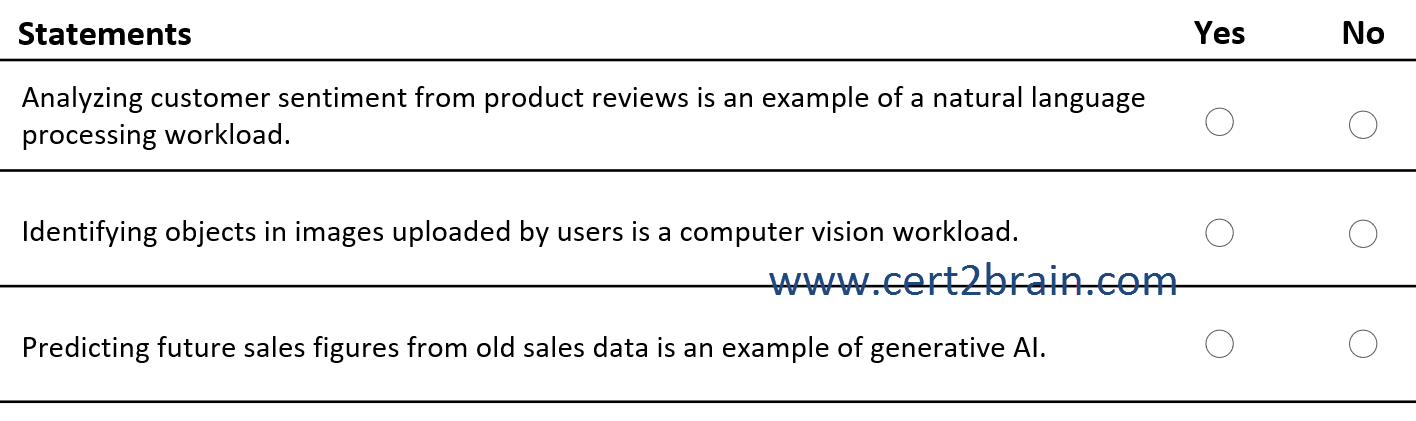
| A | Analyzing customer sentiment from product reviews is an example of a natural language processing workload: Yes
Identifying objects in images uploaded by users is a computer vision workload: Yes
Predicting future sales figures from old sales data is an example of generative AI: Yes |
| B | Analyzing customer sentiment from product reviews is an example of a natural language processing workload: Yes
Identifying objects in images uploaded by users is a computer vision workload: Yes
Predicting future sales figures from old sales data is an example of generative AI: No |
| C | Analyzing customer sentiment from product reviews is an example of a natural language processing workload: No
Identifying objects in images uploaded by users is a computer vision workload: Yes
Predicting future sales figures from old sales data is an example of generative AI: No |
| D | Analyzing customer sentiment from product reviews is an example of a natural language processing workload: No
Identifying objects in images uploaded by users is a computer vision workload: Yes
Predicting future sales figures from old sales data is an example of generative AI: Yes |
| E | Analyzing customer sentiment from product reviews is an example of a natural language processing workload: No
Identifying objects in images uploaded by users is a computer vision workload: No
Predicting future sales figures from old sales data is an example of generative AI: Yes |
| F | Analyzing customer sentiment from product reviews is an example of a natural language processing workload: No
Identifying objects in images uploaded by users is a computer vision workload: No
Predicting future sales figures from old sales data is an example of generative AI: No |
Correct answer: BExplanation:
Analyzing customer sentiment from product reviews is an example of a natural language processing workload → Yes
Natural Language Processing (NLP) enables computers to understand, interpret, and analyze human language.
Sentiment analysis is an NLP technique that determines whether text expresses positive, negative, or neutral sentiment.
For example:
- "This product is amazing!" → Positive
- "The product is okay." → Neutral
- "The quality is terrible." → Negative
Azure Language in Foundry Tools provides sentiment analysis capabilities for analyzing customer feedback, reviews, and social media posts.
Identifying objects in images uploaded by users is a computer vision workload → Yes
Computer vision enables AI systems to interpret and analyze visual information from images and videos.
Object detection is a computer vision capability that identifies objects within an image and determines their locations.
For example, an AI system can analyze an uploaded image and identify:
- Cars
- People
- Animals
- Buildings
Object detection models can also return bounding boxes that indicate where objects are located.
Azure Machine Learning supports computer vision workloads, including image classification and object detection.
Predicting future sales figures from old sales data is an example of generative AI → No
Predicting future sales figures based on historical data is an example of predictive machine learning, specifically regression or time-series forecasting.
These techniques analyze historical patterns to estimate future numerical values.
A forecasting model can use historical sales data to estimate future sales.
Generative AI, by contrast, primarily focuses on generating new content, such as:
- Text
- Images
- Audio
- Computer code
Although generative AI models can also produce forecasts, traditional sales forecasting is classified as a predictive machine learning workload rather than a generative AI workload.
References:
Choose an Azure AI targeted language processing technology
What is automated machine learning (AutoML)?
Question: 183
Measured Skill: Identify AI concepts and responsibilities (40–45%)
Select the answer that correctly completes the sentence.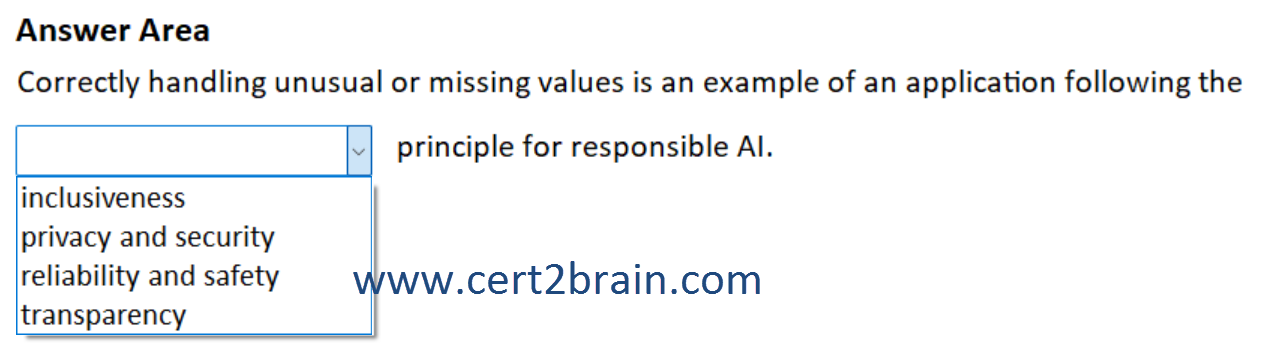
| A | Correctly handling unusual or missing values is an example of an application following the inclusiveness principle for responsible AI. |
| B | Correctly handling unusual or missing values is an example of an application following the privacy and security principle for responsible AI. |
| C | Correctly handling unusual or missing values is an example of an application following the reliability and safety principle for responsible AI. |
| D | Correctly handling unusual or missing values is an example of an application following the transparency principle for responsible AI. |
Correct answer: CExplanation:
The Microsoft responsible AI principle of reliability and safety requires AI systems to operate consistently, predictably, and safely, including when they encounter unexpected conditions.
An AI application should:
- Handle missing values: Process incomplete data without crashing or producing unreliable results.
- Handle unusual values: Respond appropriately to unexpected or extreme inputs.
- Maintain reliability: Produce consistent results under different operating conditions.
- Fail safely: Handle errors gracefully without causing harm.
Example:
An AI application predicts house prices based on property information.
If a user submits a property record with a missing number of bedrooms or an unusually large property size, the application should handle the input appropriately rather than crash or generate an unreliable prediction.
This demonstrates reliability and safety.
Microsoft explicitly associates this principle with reliable operation under unexpected conditions.
Reference: What is Responsible AI?
Question: 184
Measured Skill: Identify AI concepts and responsibilities (40–45%)
Select the answer that correctly completes the sentence.
| A | When using Azure Language in Foundry Tools, use conversation Personally Identifiable Information (PII) to identify people, places, and events. |
| B | When using Azure Language in Foundry Tools, use language detection to identify people, places, and events. |
| C | When using Azure Language in Foundry Tools, use named entity recognition (NER) to identify people, places, and events. |
| D | When using Azure Language in Foundry Tools, use Text analytics for health to identify people, places, and events. |
Correct answer: CExplanation:
Named Entity Recognition (NER) is a natural language processing (NLP) capability of Azure Language in Foundry Tools that identifies and categorizes named entities in unstructured text.
NER can identify entities such as:
- People: Bill Gates, Satya Nadella
- Places: Seattle, London, Germany
- Events: Olympic Games, World Cup
- Organizations: Microsoft, Contoso
- Dates: January 1, 2026
Microsoft explicitly lists people, locations, and events among the entity types supported by NER.
Reference: How to use Named Entity Recognition (NER)