Microsoft - AZ-802: Administering Windows Server
Sample Questions
Question: 197
Measured Skill: Secure Windows Server infrastructure (10–15%)
Your network contains an Active Directory Domain Services (AD DS) domain named contoso.com. The domain contains the organizational units (OUs) shown in the following table.
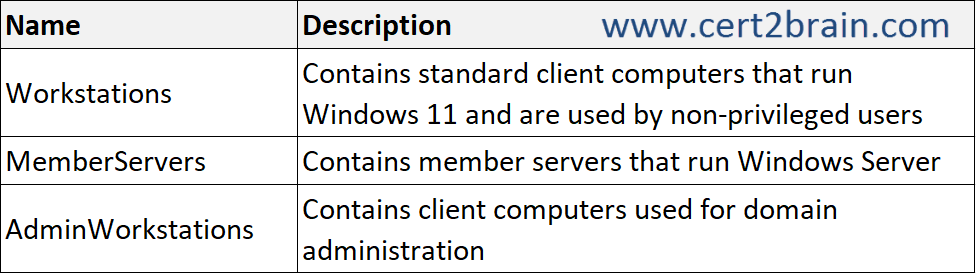
Members of the Domain Admins group can sign in to the devices in all the OUs.
You need to restrict the Domain Admin sign-ins. The solution must meet the following requirements:
- Prevent the Domain Admins members from signing in to the devices in Workstations and MemberServers.
- Continue to allow the Domain Admins members to sign in to the computers in AdminWorkstations.
What should you do?| A | Link a Group Policy Object (GPO) to contoso.com and configure Restricted Groups. |
| B | Link a Group Policy Object (GPO) to contoso.com and assign Domain Admins the Deny log on locally user right. |
| C | Link a Group Policy Object (GPO) to the Workstations and MemberServers OUs, and assign Domain Admins the Deny log on locally user right. |
| D | Link a Group Policy Object (GPO) to the AdminWorkstations OU and assign Domain Admins the Allow log on locally user right. |
Correct answer: CExplanation:
The solution must meet two requirements:
- Prevent members of Domain Admins from signing in to computers in the Workstations and MemberServers OUs.
- Continue allowing Domain Admins to sign in to computers in the AdminWorkstations OU.
To achieve this, configure a GPO that applies only to the Workstations and MemberServers OUs.
Configuration
Step 1: Create a GPO that restricts Domain Admin sign-ins.
Step 2: Configure the following Group Policy setting:
Computer Configuration → Policies → Windows Settings → Security Settings → Local Policies → User Rights Assignment
Setting: Deny log on locally
Assigned group: Domain Admins
Step 3: Link the GPO to both:
- Workstations OU
- MemberServers OU
Do not link the GPO to the AdminWorkstations OU.
This configuration prevents Domain Admins from signing in locally to standard workstations and member servers while preserving their ability to sign in to administrative workstations.
Microsoft confirms that Deny log on locally takes precedence over Allow log on locally.
Important: Local sign-in vs. Remote Desktop
The Deny log on locally setting prevents interactive sign-ins at the computer console. It does not prevent Remote Desktop sign-ins.
If the requirement is to prevent Domain Admins from signing in through both methods, you must also configure: Deny log on through Remote Desktop Services
References:
Deny log on locally
Implementing Least-Privilege Administrative Models
Question: 198
Measured Skill: Secure Windows Server infrastructure (10–15%)
Your network contains an Active Directory Domain Services (AD DS) domain. The domain contains a domain controller named DC1.
The domain uses Microsoft Entra Connect sync with a Microsoft Entra tenant and uses Microsoft Entra Password Protection to enforce a custom banned password list.
You deploy a new domain controller named DC2 to the domain.
You discover that the custom banned password list is applied inconsistently and often allows banned passwords to be used.
You need to ensure that the custom banned password list is always enforced.
What should you do on DC2?| A | Provide access to the https://login.microsoftonline.com and https://enterpriseregistration.windows.net URLs. |
| B | Install the Microsoft Entra Password Protection proxy service. |
| C | Install the Azure Monitor Agent. |
| D | Install the Microsoft Entra provisioning agent. |
| E | Install the Microsoft Entra Password Protection DC agent. |
Correct answer: EExplanation:
The DC agent must be installed on every domain controller where you want Microsoft Entra Password Protection enforced. Microsoft explicitly states that the password policy is enforced only on domain controllers that have the DC agent installed.
In this scenario:
- DC1 already participates in Microsoft Entra Password Protection.
- DC2 is a newly deployed domain controller.
- Windows clients can send password changes to either DC.
- If DC2 doesn't have the DC agent, password changes processed by DC2 aren't validated against the Microsoft Entra banned password lists. This explains the inconsistent behavior.
Reference: Enforce on-premises Microsoft Entra Password Protection for Active Directory Domain Services
Question: 199
Measured Skill: Secure Windows Server infrastructure (10–15%)
You have a server that runs Windows Server.
You need to enable the following security features:
- Core isolation
- Force randomization for images (Mandatory ASLR)
Which Windows Security tile should you use to enable each feature?
(To answer, select the appropriate options in the answer area. NOTE: Each correct selection is worth one point.)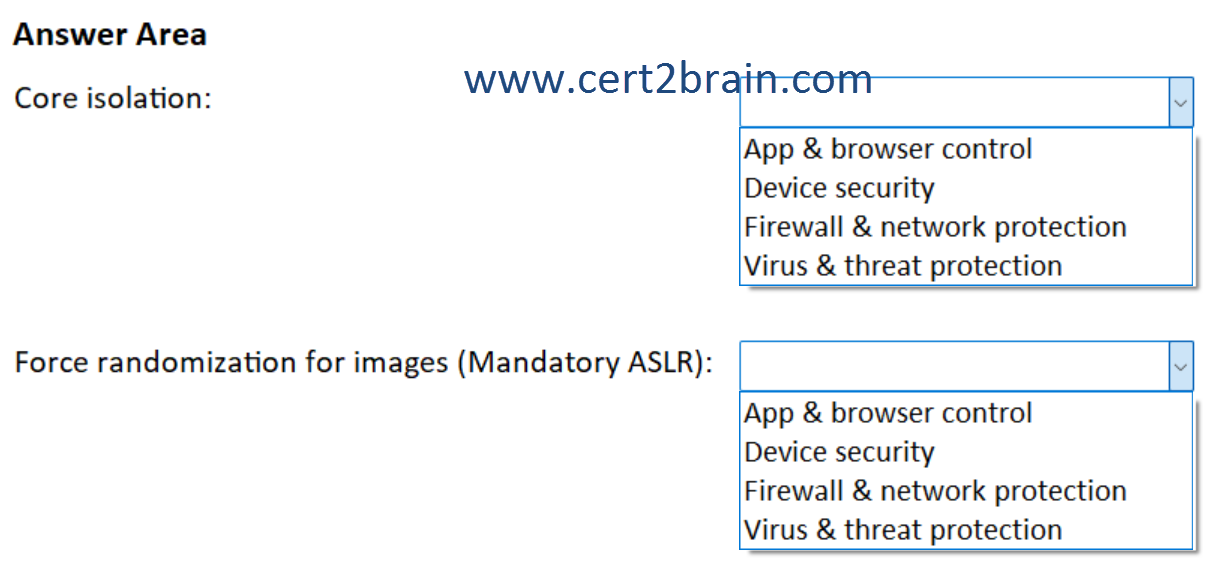
| A | Core isolation: App & browser control
Force randomization for images (Mandatory ASLR): Firewall & network protection |
| B | Core isolation: Device security
Force randomization for images (Mandatory ASLR): Device security |
| C | Core isolation: Device security
Force randomization for images (Mandatory ASLR): App & browser control |
| D | Core isolation: Firewall & network protection
Force randomization for images (Mandatory ASLR): Virus & threat protection |
| E | Core isolation: Firewall & network protection
Force randomization for images (Mandatory ASLR): Firewall & network protection |
| F | Core isolation: Virus & threat protection
Force randomization for images (Mandatory ASLR): App & browser control |
Correct answer: CExplanation:
Core isolation → Device security
Core isolation is part of Windows virtualization-based security (VBS) and is managed from the Device security area of Windows Security.
Force randomization for images (Mandatory ASLR) → App & browser control
Mandatory ASLR is an Exploit protection mitigation. Microsoft documents Force randomization for images (Mandatory ASLR) as one of the available Exploit protection mitigations. Exploit protection can be configured through the Windows Security app.
The navigation is:
Windows Security → App & browser control → Exploit protection → Exploit protection settings → System settings → Force randomization for images (Mandatory ASLR)
References:
Exploit protection reference
Enable exploit protection
Question: 200
Measured Skill: Secure Windows Server infrastructure (10–15%)
Your network contains an Active Directory Domain Services (AD DS) domain.
You need to configure a ticket-granting ticket (TGT) lifetime for specific user and computer accounts. The solution must meet the following requirements:
- Minimize the impact on the other user and computer accounts in the domain.
- Minimize administrative effort.
What should you configure?| A | A dynamic access control policy |
| B | A fine-grained password policy |
| C | An authentication policy and an authentication policy silo |
| D | A password policy |
Correct answer: CExplanation:
In AD DS, authentication policies can control Kerberos authentication settings for selected accounts, including the ticket-granting ticket (TGT) lifetime.
An authentication policy silo lets you apply that authentication policy specifically to designated:
- user accounts
- computer accounts
- service accounts
This satisfies both requirements because the shorter or customized TGT lifetime affects only the accounts assigned to the silo, rather than all accounts in the domain.
References:
Authentication Policies and Authentication Policy Silos
Guidance about how to configure protected accounts
Question: 201
Measured Skill: Secure Windows Server infrastructure (10–15%)
You have two servers named Server1 and Server2 that run Windows Server.
You perform the following actions:
- On Server1, you create an Application Control policy named Policy1 that contains a rule to allow all the executables in a folder named D:\Folder1.
- You add a rule to Policy1 to trust a folder named \\Server2\Folder2.
- You deploy Policy1.
You need to verify that Policy1 is applied to Server1.
Which Event Viewer log should you review?| A | Security |
| B | Applications and Services Logs\Microsoft\Windows\CodeIntegrity\Operational |
| C | Applications and Services Logs\Microsoft\Windows\AppLocker\MSI and Script |
| D | Applications and Services Logs\Microsoft\Windows\DeviceManagement-Enterprise-Diagnostics-
Provider\Admin |
Correct answer: BExplanation:
For App Control for Business policies, formerly Windows Defender Application Control (WDAC), Windows records policy activation events and events concerning executables, DLLs, and drivers in:
Applications and Services Logs > Microsoft > Windows > CodeIntegrity > Operational
Microsoft specifically states that this log includes events relating to App Control policy activation, making it the appropriate place to verify that Policy1 has been applied to Server1.
Reference: Understanding App Control events